《双点博物馆-虚拟机版/Two Point Museum HYPERVISOR》-Build 22389256官中免安装-简中5.11GB

最近评测:特别好评 (151)
全部评测:特别好评 (8,297)
发行日期:2025 年 3 月 4 日
评测
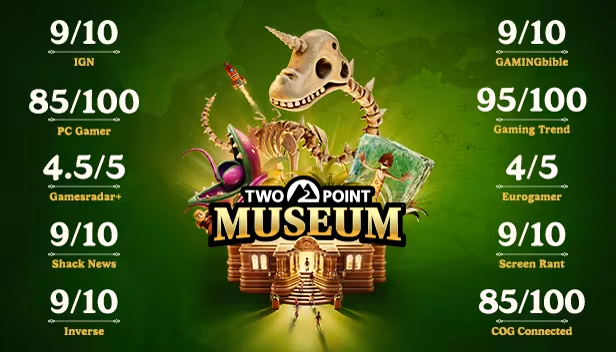
“Two Point Museum is a rewarding, deep, challenging, and highly entertaining tycoon game that demonstrates Two Point Studios has really hit its groove with this third iteration of the idea”
9/10 – IGN
“As far as I’m concerned, this is the best entry in the Two Point series and if you were already a fan of those, you’re going to adore this trip through history”
9/10 – GAMINGbible
“Two Point Museum is the coolest, cosiest, and most evolved iteration of the formula to date”
85/100 – PC Gamer
关于此游戏
《双点博物馆》游戏内容:
设计、管理并打造令人惊叹的博物馆
双点县中5个独特的博物馆主要地点:
- 史前 - 纪念之路
- 海洋生物 - 嘘嘘海湾
- 超自然 - 哀伦山庄
- 科学 - 低端废土
- 太空 - 佩博里高地
3间快闪博物馆,包含独特任务及挑战
沙盒模式,可尽情打造属于自己的庞大博物馆!
6种主要展示品类型及超过30种展示品子类别
前往5个不同的探险地图及超过100个独特的调查点进行探险行动
发掘超过200个独特的展示品,不断充实贴纸手册
超过350种装饰物品,点缀出独一无二的博物馆
接待18种不同类型的访客,让他们玩得开心……包括那些调皮捣蛋的孩子们
在双点县里解锁并精心运营所有的博物馆吧!
作为一名新手博物馆馆长,你的任务是精心设计自己的博物馆,不断丰富博物馆的内容,想方设法为访客带来终极的参观体验。调配专家参与长途探险行动,为博物馆寻找更多新展示品。不断提升博物馆的热议度,吸引更多渴望知识的访客前来参观,让他们在博物馆留下美好的回忆。与此同时也要提升展示品的安保措施,保持馆内的卫生清洁以及员工的幸福感……当然也不要忘记让孩子们离珍贵的恐龙化石远点。

探寻更多展示品
作为一名博物馆馆长,亲自设计并运营博物馆,不断丰富博物馆的内容。派遣专业知识半桶水的专家们进行探险行动,寻找更多保存大致完好的稀有文物。当专家们带着惊人的新发现安全归来……当然他们最好能够“安全”归来,不要忘记把他们的辛苦成果放在博物馆里展示。
亲自决定下一次的探险目标,解锁更多新的探险地点。不断完成作为探险纪念的贴纸手册,记录每一次惊险的探险旅程。
工作远远不止于此,展示品的维护同样重要。当专家们奔波在双点县内外进行令人激动的探险行动时,作为馆长的你需要管理员工的日常工作,维护展示品和博物馆环境等等,一手打理好馆内的大小事务,如果照顾食人花不够刺激,别忘记还有鬼鬼祟祟的小偷们需要盯着。除了小偷之外,孩子们是更加常见的棘手人物。为了防止孩子们破坏展示品,请确保部署了充分的安保措施来保护珍贵的展示品!
独一无二的创意设计
发挥创造力来设计独一无二的博物馆!馆长可对博物馆进行高自由度的装饰设计,打造不同主题的区域,引导访客体验精彩的博物馆之旅。不论是墙壁涂鸦还是地板地毯,运用各种装饰发挥创意来点缀博物馆。史前植物、快融化的冰封原始人以及恐龙骨架,将各式展示品摆放至绝佳的展示位置。
为馆内打造出完美的参观环境后,还可以安排导览活动,由馆内优秀的专家们带领访客在精心设计的参观路线上开启博物馆之旅。导览活动为访客们提供更加丰富的参观体验。高热议度的展示品拥有极高的品质和亮眼的装饰品,可为访客提供许多新鲜的知识,给访客留下美好的回忆……满意的访客们也会更乐于慷慨解囊,贡献更多捐款。

为访客提供极致的参观体验
真诚才是待客之道!经常来访博物馆的访客可能会有不同的兴趣爱好,但他们也有许多共同的偏好……例如,干净整洁的博物馆环境、充足的茶点小食、宽敞的洗手间以及商品琳琅满目的纪念品商店。当然除此之外,最重要的是令人眼花缭乱的展示品。因此展示品的日常维护是非常重要的……否则,可能会引起访客们的不快。
来自双点县的访客们络绎不绝,每个人都希望在这里参观到自己喜欢的全新展示品。狂热的恐龙迷、植物学爱好者、追求刺激的灵异爱好者等等……尝试满足每一位访客的需求吧。为访客提供超乎想象的精彩参观体验。沉浸在博物馆参观中的访客会在馆内待更长时间,也更有可能贡献更多捐款,给博物馆留下好评!
系统需求
- 操作系统: Windows 10 version 21H1 (build 19043) or newer
- 处理器: Intel Core i3-8100 or Ryzen 5 1400
- 内存: 6 GB RAM
- 显卡: Nvidia GeForce GT 1030 (2 GB) or AMD Radeon RX 560 (2 GB) or Intel UHD Graphics 630
- 存储空间: 需要 8 GB 可用空间
- 声卡: 基本音频设备
- 操作系统: Windows 10 version 21H1 (build 19043) or newer
- 处理器: Intel Core i3-8100 or Ryzen 5 1400
- 内存: 6 GB RAM
- 显卡: Nvidia GeForce GT 1030 (2 GB) or AMD Radeon RX 560 (2 GB) or Intel UHD Graphics 630
- 存储空间: 需要 8 GB 可用空间
- 声卡: 基本音频设备
支持作者
Steam商城:https://store.steampowered.com/app/2185060/双点博物馆/
备注说明
原理以及相关工具更新:https://steamzg.com/62245/,注意去更新一下启动工具DenuvoLauncher_MQ.exe
启动说明
打开游戏之前的环境准备(所有人都必须做 只需要做一次 后续畅玩所有D加密游戏)
第一步:bios设置
1. 开启虚拟化: 找到 SVM Mode (AMD) 或 Intel Virtualization Technology (Intel),设置为 Enabled。
2.关闭安全启动: 找到 Secure Boot,设置为 Disabled。
注:每个主板具体设置不同 不知道设置可以百度查询或问Deepseek自己主板型号的相关设置
第二步:关闭BitLocker
1.打开控制面板 右上角查看方式切换为小图标 找到“Bitlocker驱动器加密”
2.把所有驱动器都设置为关闭,有多少个盘全部都得关!
以上都完成后:打开DenuvoLauncher_MQ.exe 检查设置是否都已经完成 绿色文字表示完成
最后步骤
我们点击软件的一键配置环境,然后重启电脑。【开机时点F7 或 手动选择禁用驱动程序强制签名】。重启电脑后完电脑会进入测试模式,右下角可以看到状态,继续打开DenuvoLauncher_MQ.exe点击。启动游戏
学习
